 UK: 0844 854 9218 | International: +44 (0)1488 580017


Choosing online training for your team starts with understanding what employees need to know and do better. The best solution matches their roles, skills gaps and working conditions, while fitting your budget and providing evidence of learning.
Whether you’re planning induction, developing managers or addressing compliance needs, this guide helps UK employers, HR professionals and learning and development managers compare course quality, accessibility, assessment, delivery and purchasing options. You’ll also find practical questions to ask providers and a free Online Training Selection Scorecard to help you compare shortlisted options and choose training your employees can use effectively.
In this guide
- Identify your team’s training needs
- Match courses to roles and learning outcomes
- Compare the learning experience, format and assessment
- Check accessibility, devices and access
- Understand certificates, approvals and competence
- Choose the Right Learning Platform for Staff Training, Administration and Reporting
- Compare purchasing options and total costs
- Compare providers using a weighted scorecard
- Pilot, introduce and evaluate your training
- How eLearning Marketplace can help
Identify your Team’s Training Needs
Before browsing courses, answer these six questions to create a clear buying brief:

- What workplace problem are we trying to solve?
- Who needs training and at what level?
- What must learners know or demonstrate afterwards?
- How will they access and complete the learning?
- What evidence do managers need?
- What is the total cost of making the training effective?
Identify your Team’s Training Needs Before Browsing Courses
A training needs analysis (TNA), see our free TNA template and guidance, compares the skills people currently have with those their roles require. You may also find our free Roles and Competency Mapping Guidance and Template useful. It can be straightforward: review job responsibilities, speak with employees and managers, and examine recurring problems.
Prioritise Three Types of Need
- Essential role and risk needs
Knowledge and skills needed to carry out work safely and appropriately in line with workplace compliance. These should be considered alongside your organisation’s own procedures and relevant sector requirements. - Performance needs
Skills that improve the quality, speed or consistency of work, such as customer communication, digital confidence or management capability. - Development needs
Learning that prepares employees for broader responsibilities, career progression or future business plans.
This separation of needs helps you protect priority training while still investing in professional development. For example:
| Team or role | Identified need | Intended workplace outcome | Evidence to review |
|---|---|---|---|
| New starters | Inconsistent induction | Employees understand key procedures and know where to get help | Induction checks and manager observations |
| Customer-facing staff | Difficulty handling complaints | More confident conversations and appropriate escalation | Complaint reviews and observed practice |
| New managers | Limited experience giving feedback | Clearer expectations and more useful performance discussions | Conversation plans and employee feedback |
| Office and remote employees | Uncertainty about suspicious messages | Employees recognise concerns and use the agreed reporting process | Scenario responses and reporting exercises |
| Hospitality staff | Gaps in food safety knowledge | More consistent application of relevant procedures | Knowledge checks and workplace observations |
These are planning examples, not a universal list of mandatory courses. Match training to the actual work and responsibilities of each learner.
Match Online Courses to Roles, Levels and Outcomes
Two courses with similar titles can differ substantially. One might introduce a subject; another might address supervisory responsibilities or a particular sector. Compare the learning outcomes and intended audience before comparing prices. The price does not always signify quality, nor does the duration of the course.
Ask whether the learner is new to the subject, refreshing existing knowledge or preparing for greater responsibility. Check whether examples reflect the situations employees encounter at work and whether the content is appropriate to the learner’s relevant context.
Examples to Explore through eLearning Marketplace
Our best selling publisher course catalogue includes titles such as:


These illustrate how a training search can move from a broad subject to a more specific role or task. Use the individual course description to check whether its scope and level match your workforce requirements.
Compare the Learning Experience, Format and Assessment
Relevant content must also be easy to navigate, understand and apply. Choose a course format and duration suited to the subject, giving employees enough depth and practice to meet the learning objectives. Bite-sized modules can support focused learning, revision and recall, but covering complex topics too briefly risks oversimplification and fragmented knowledge.
Look for questions, practical activities and realistic scenarios throughout the course, rather than relying solely on a final assessment. Familiarity with information can feel like understanding—the fluency illusion—but recalling knowledge and making decisions helps reveal gaps. Branching scenarios take this further by allowing learners to explore workplace situations and experience the consequences of their choices. One such publisher’s courses require the learner to work through a scenario as it actually happens in the workplace:



The quality of feedback matters as much as the questions. Useful feedback explains why an answer is appropriate, corrects misconceptions and helps learners revisit content and try again. Checks throughout the course, combined with a final assessment, provide a fuller picture of learning. Practical competence may also require workplace observation or assessment.
Before purchasing, request a preview or free trial, available through eLearning Marketplace. Ask representative employees to test relevance, navigation and activities using the intended devices, including learners with different levels of digital confidence.
Check Accessibility, Devices and Access
Check Accessibility in Practice
Course accessibility features help employees with different needs access and engage with online learning. Choosing accessible courses removes barriers to participation and gives more learners the opportunity to develop and demonstrate their knowledge and skills.


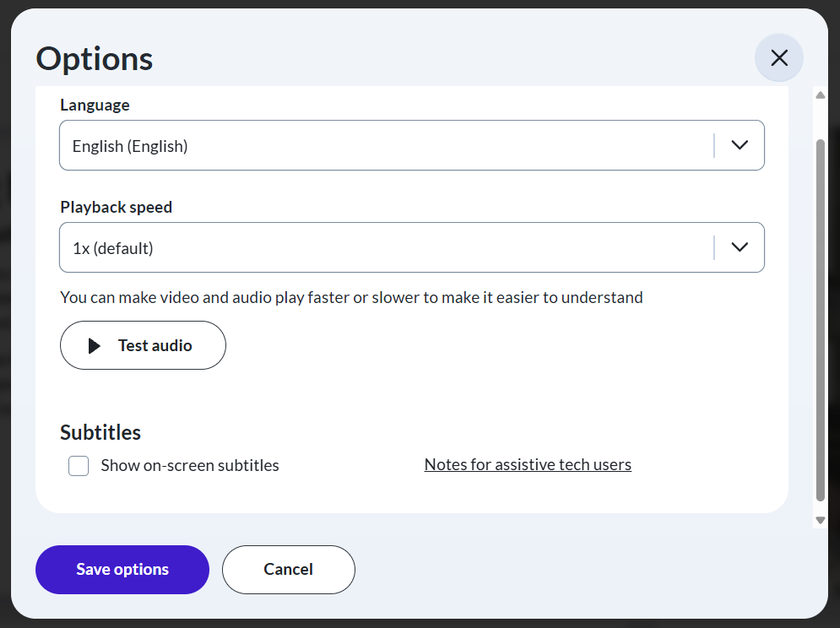
Ask about captions, transcripts, keyboard navigation, screen reader support, text readability and the accessibility of assessments. Test the actual course as well as the learning platform, because their accessibility features may differ.
The image below is selected from the opening course page and enables the learner to make a range of accessibility settings to meet their needs. This publisher’s courses also have a downloadable e-book that covers the course.
If translation is offered, establish whether it is professionally reviewed or automated, and whether assessments and downloadable materials are also translated. As mentioned, a free trial will enable you to establish if the course meets your employees needs. For complex terminology, learners may need additional explanation or support.
Confirm Device and Access Requirements
Do not assume every course works equally well on every device. Learning on mobile devices has become very popular, however do consider the screen size and how well the required course displays and reacts to interactive activities. Text can become hard to read, diagrams may lose detail, and employees may need to scroll repeatedly to follow instructions and make choices. For example, drag-and-drop exercises, detailed workplace scenarios and tasks with multiple answer options can be awkward to complete using touch controls if they have not been designed to work effectively on mobile devices.
For detailed or complex tasks, give employees access to a larger screen to support better understanding and a more accurate assessment of their learning. If using PCs or laptops, check system and browser compatibility and audio requirements. Confirm that the course runs reliably on the organisation’s internet connection and that firewalls or security settings do not block content.
For employees without regular computer access, plan a suitable place and time to learn. Online training is easier to complete when access is part of the working arrangement rather than another obstacle employees must solve themselves.
Understand Certificates, Approvals and Practical competence
Read approval and certificate claims carefully. A certificate may record completion or a successful knowledge assessment. It does not automatically demonstrate that an employee can perform a task competently in the workplace.
Likewise, CPD (Continuing Professional Development) or RoSPA (Royal Society for the Prevention of Accidents) approval should not be treated as interchangeable with a regulated qualification or an occupational licence. Establish exactly what recognition applies to the specific course and whether it meets your intended purpose.

- Who has approved or accredited this particular course?
- What does that approval cover?
- What must learners do to pass?
- What information appears on the certificate?
- Is supervised practice or a separate assessment needed?
For practical tasks, plan how the learning will connect with demonstrations, observations and local procedures. Choosing suitable training involves both the learning content and how your organisation applies it.
Choose the Right Learning Platform for Staff Training, Administration and Reporting
Think through what happens after purchase. Someone must allocate training, help learners access it, monitor progress and maintain records.
If you are an employer purchasing online training for staff and you don’t have your own learning management system (LMS), then you have more to consider than just choosing the right training. You must also give consideration to how learners will access the training and how you will manage the training that is delivered.
Points to consider regarding the learning platform:
- Is it straightforward for learners to login, access, and undertake their assigned training?
- If they have problems logging in can the reset their password?
- Does the platform support all the devices that you intend to use?
- Are certificates easily accessible by learners and training managers?
- Can managers access the platform to enrol staff, allocate course enrolments, set deadlines and send training reminders without an excessive amount of work?
- Can managers obtain information on training progress, and assessment and achievement results?
- What support is available to learners, managers and administrators of the LMS?
- Who can access personal information, what data is collected and how retention and deletion are handled.
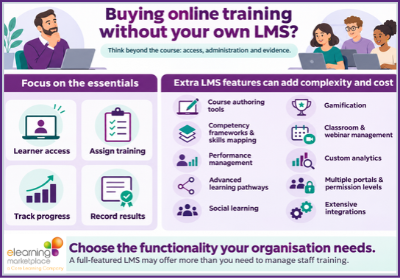
It is important to say that an LMS can offer far more functionality than an employer needs to assign training and record progress and results. Features that add complexity and cost include:
- Course authoring tools
- Competency frameworks and skills mapping
- Performance management
- Advanced learning pathways
- Social learning
- Gamification
- Classroom and webinar management
- Custom analytics
- Multiple portals and permission levels
- Extensive integrations
These features can be valuable when there is a clear need for them, but they will increase costs, setup time and administration. For employers with straightforward requirements, easy course allocation, progress tracking, assessment results and downloadable training records the eLearning Marketplace LMS is ideal. From a free service to a budget-friendly model, it does what it says on the tin for less than you think:
The eLearning Marketplace offers a free LMS with many, or all of the features you will require. Take a look at our LMS page :
Are you an employer with your own LMS?
If you are, then the eLearning Marketplace can supply their whole course catalogue as SCORM files to run on your own LMS, with the embedded licence that you choose.
Compare Purchasing Options and Total Costs
Purchasing Models
Online training can be purchased in different ways. Compare the arrangements available from your shortlisted providers and establish what is included before committing.
| Purchasing approach | When to consider it | Questions to ask |
|---|---|---|
| Individual course purchases | A specific need for a small number of learners | How long does access last, and are assessments and certificates included? |
| Multiple licences or a team quote | Several employees need defined courses | Are discounts available, and when must licences be allocated or used? |
| Course bundles or pathways | A role requires several related topics | Do all included courses contribute to the intended outcome? Are discounts available? |
| A subscription library | Ongoing learning across several subjects | Which titles are included, what is the minimum term, and how are users counted? |
| Licensed content for an existing platform | Your organisation already manages learning centrally | What course formats can be supplied, licence conditions and reporting arrangements are supported? |
These are market purchasing options, not a statement that every provider or course offers every arrangement. Ask the eLearning Marketplace which options are available for your shortlisted content and team size.
The Cost of Learning

Consider:
- Course fees
- Employee learning time
- Administration of the learning platform
- Training implementation
- Any follow-up assessment or coaching.
- Compare quotes on a consistent basis, including VAT treatment and any recurring charges.
Check purchasing terms before investing time in course selection: some suppliers require two or three year contracts that can be costly to exit. A one year subscription, pay-as-you-go arrangement or small batches of enrolments may better suit your needs. Value depends on relevant content and employees having time to learn: a £1,200 annual subscription costs £20 per completion if staff complete 60 courses, but £60 if they complete only 20, excluding employee time and other costs.
Compare Providers Using a Weighted Scorecard
A scorecard makes the decision more transparent. Set your priorities before reviewing sales proposals, then score each option using the same evidence.
The following is an illustrative framework. You can download our an interactive ‘Online Training Selection Scorecard‘ to compare three training providers’ offering.
| Selection criterion | Suggested weight | Evidence to request |
|---|---|---|
| Fit with roles and learning outcomes | 30% | Course content, intended audience and course preview |
| Learning quality and assessment | 20% | Sample activities, feedback and assessment approach |
| Accessibility and learner usability | 15% | Feature information and representative learner testing |
| Administration and reporting (LMS) | 15% | Demonstration, sample reports and record export details |
| Total cost and licence terms | 15% | Written quote, access period and renewal conditions |
| Support and content maintenance | 5% | Support arrangements and update process |
| Total | 100% |
Pilot, Introduce and Evaluate your Training
Pilot the Training Before Committing to a Wider Roll-out
A small pilot can reveal issues that a brochure cannot. Choose a group that reflects your workforce rather than relying only on confident computer users.

Agree pilot success criteria in advance. These might include successful access on intended devices, acceptable completion times, positive feedback on relevance and evidence that learners can apply the key ideas.
Build a Realistic Roll-out Plan
An effective roll-out connects course completion with workplace support. Explain why the training matters, what employees are expected to learn and how managers will help them use it. Take a look at our Planning and Evaluating Online Learning guidance, which includes a four week roll out plan.
Measure Whether Online Training Makes a Difference
Completion rates tell you whether employees finished the assigned learning. They do not, on their own, tell you whether performance improved.

- Participation: Who started, completed or needed help?
- Learning: What knowledge or skills did assessments demonstrate?
- Application: Are employees using the learning in their work?
- Results: Have the relevant business measures changed?
Where financial benefits can be credibly estimated, calculate training return on investment, ROI. Our Planning and Evaluating Online Learning guidance will provide you with details regarding ROI.
How eLearning Marketplace Can Help
eLearning Marketplace Ltd offers over 5,000 online courses from more than 80 publishers, serving clients in over 50 countries. Our team acts as your personal shopper, recommending courses to suit your employees, objectives and budget, arranging trials and explaining flexible purchasing options. Start with your priorities and expand as you see results.
Ready to find the right training for your team? Explore our online courses or contact us to discuss your requirements.
Frequently asked questions
How do I choose online training for my employees?
Identify the workplace outcome, assess skills gaps and match courses to employees’ roles and experience. Compare content, accessibility, assessment, reporting and total cost, then pilot the shortlisted option before a wider roll-out.
Is a subscription better than buying individual courses?
A subscription may suit ongoing learning across several subjects. Individual purchases may suit a small number of learners with specific needs. Compare realistic usage, included content, licence conditions and total cost before deciding.
Can online training support both compliance and professional development?
Yes. A programme can combine relevant compliance topics with management, communication and other development skills. Select learning according to each role and supplement it with local procedures, supervision or practical assessment where needed.
Does a course certificate prove workplace competence?
A certificate may demonstrate completion or a successful knowledge assessment. It does not automatically prove practical competence. Check the assessment and arrange workplace observation or further assessment where the role requires it.
How can we measure the value of team training?
Track participation, learning, workplace application and relevant business results. Record a baseline before training and account for other factors that could influence outcomes. Use financial ROI only where benefits can be credibly attributed and valued.
You may also like:
- AI Skills Becoming Essential as Employers Face Training Gaps
- Why Smarter Learning Unlocks Employee Potential and ROI
- E-Learning Success Stories: How Organisations are Transforming Workplace Learning
Author: Carolyn Lewis